Friday, 29 May 2015

Android M Camera Preview for Any Android Mobile (APK) 2015

Android M Camera Preview app/apk: Camera Preview of Android M is Released, you can install Android M Camera app in your Android mobile, which Is Running on 4.4+ Android version. The apk version name is com.google.android.GoogleCamera , which is officially available from Google. android camera preview size is around 8.92 Mb. If you are Android lover, wanna try Android M Camera app in your Android Mobile phone then your wait is over Today. Recently Google announced Android M , and It’s preview is released officially, you can easily install this app as normal apk and you can use this awesome camera app, which is Preview of Android M, Officially launched by Google.
Android M Camera Preview

Android M Camera Preview Apk:

Everyone is exciting about Android M, After Getting Android l with Cooler Ui with White shade, now People want Android with another look and Feel in Android M. For Getting Android M Preview in your Mobile Phone, People needs to Buy High Cost Phones Like Nexus 6, Nexus 5 etc. Everyone can’t able to Buy high cost Phones, So after release of Preview, you can Try some apps of Android M in your Mobile Phone for get UI of Android M In your Mobile Phone. It’s First Impression of Android M Released with Camera app. Google is going to be Hit day by day, So we suppose that Android M Will be better than all Other Platforms and it will give awesome Performance, Features.

Android M Camera app (APK) from Developers Preview:

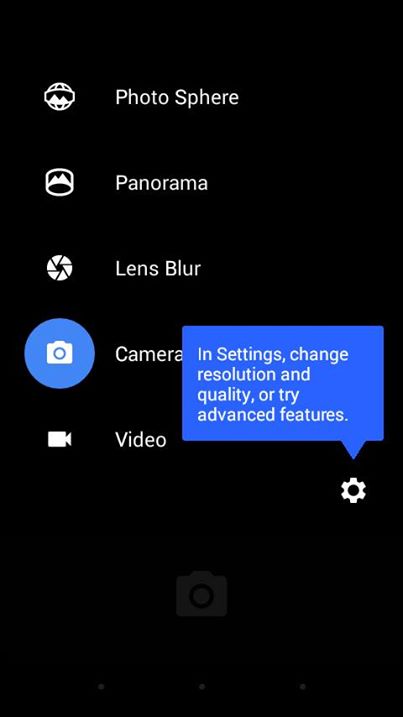
After Google released Android M Preview on 28 May 2015, now you can enjoy Camera app/apk of Android M In your Mobile phone at one condition, if your Phone Running on Android Kitkat 4.4 or Later. If your Phone’s OS Version less than 4.4 then you can not use This Android M Camera app in your Android Phone. I have Tested This app in my Micromax Canvas A1, Some features are not Worked like Panorama, and Lens Blur Effects. Sadly these features are Not worked in my mobile Phone, but you can try this app and These features may work on your mobile Phone which is running on Android 4.4 or Later. Over all it’s an Awesome Camera app which is Taken from Developers Preview of Android M.

Requirements for Install Android M Camera app in Android Phone:

  • Android Phone Running on Android 4.4 Kitkat or Later
  • Android M Camera app/apk from Below Link
  • Unknown Sources Enabled (Steps Below)

Android M Camera Preview Apk Download From here Version 2.5.044

Android M Camera Preview

Screenshots of Android M Camera Preview app from Developers Preview:

Android M Camera PreviewCamera Preview Of Android MAndroid M Camera apk Download android_m_camera_previewLens Blue Android M Camera Effect

How To Install Android M Camera app in Any Android Phone:

  • At First Download Android M Camera Preview App From above or from here – Android M Camera Preview apk
  • After Download Apk from Above Link, Click on Apk
  • Make Sure you Have Enabled Unknown Sources
  • For Enable Unknown Sources Open Phone’s Settings-Security-Unknown Sources
  • Make a Tick on Unknown Sources
  • After That You Have to Install Downloaded Apk
  • After Successfully Install Android M Apk, Open App Drawer and Launch Camera app
  • Now Enjoy Android M Developers Preview Camera app in your Android Phone which is Running on Android 4.4 Kitkat or Later

This was Latest Android M Camera app which is Officially Launched by Google from Android M Preview, you can use this app in android phones running on android kitkat version 4.4 or later. Some features may not work because it’s first preview from Android M. So Let’s Enjoy Android M Preview Camera apk and Keep Photographing from New Camera app.

Paytm Offer: Get CashBack of Rs. 50 on DTH Recharge of Rs. 500 or Above May 2015 (New Offer)

Hay Friends, Paytm is offering 50 rs cashback on 500 or more dth recharge. previous paytm was offering rs 10 cashback on 5 via paytm wallet, but now they are offering 50 cashback on 500 or more Dth recharge, Follow below easy steps for get 50 rs cashback on 500 or more Dth recharge at Paytm.

PayTM-Logo

Steps for get Rs. 50 cashback on 500 or more at PayTM:

  • Open Paytm DTH Recharge offer page from here – http://paytm.com
  • After open Above offer page Initiate recharge of 500 or more at your DTH Card
  • Then apply below promocode.
               Promocode – DTH50
  • Apply Promocode, 50 rs cashback will be credited in your paytm wallet under 1 hour.
  • Read Below terms & Conditions for get more info.

Terms & Conditions:

  • Valid Upto 2 times per user.
  • Valid for both old & new Users.
  • Cash back will be credited under 1 hour.
  • Valid only on DTH recharges.

Paytm Rs. 20 Cashback on Rs. 20 & Rs. 30 Cashback on Rs. 30 Recharge June 2015 [New Users]

Hay Guys, Paytm offering 20 rs cashback on 20 rs or more recharge for new users of paytm. if you are a new user of paytm then you can also get 20 rs free recharge. Cashback amount will be credited in paytm wallet. paytm wallet can be use for recharges, online shopping etc. so create new account on paytm and grab this awesome offer now.

Paytm 20 Cashback on 20 rs

Steps for get 30 rs cashback on 30 rs Recharge at Paytm for New Users:

  • At First Install paytm app from here – https://paytm.com/mobile
  • After Install Paytm app, Create new account
  • After creating new account, Initiate a recharge of rs 30 or more
  • At Next page apply below promo code
Promocode – DOUBLE30
  • After apply Above Promocode, Make payment from Debit/Credit Cards
  • After successfully recharge, you will get 30 rs Cashback under 1 hour in your Paytm wallet, which can be use for recharges and shopping etc.

Steps for get 20 rs cashback on 20 rs Recharge at Paytm for New Users:

  • At First Install paytm app from here – https://paytm.com/mobile
  • After Install Paytm app, Create new account
  • After creating new account, Initiate a recharge of rs 20 or more
  • At Next page apply below promo code
Promocode – DOUBLE20
  • After apply Above Promocode, Make payment from Debit/Credit Cards
  • After successfully recharge, you will get 20 rs Cashback under 1 hour in your Paytm wallet, which can be use for recharges and shopping etc.

{Still Live} Add Rs. 10 And Get Rs.20 in your Mobikwik Wallet June 2015[All Users]

Mobikwik add 10 and get 20: Mobikwik wallet can be use for recharge, Data Card recharge and Bill Payment. Mobikwik offering extra rs 10 cashback on adding rs 10 into mobikwik wallet via debit/credit cards, for both old and new users. This offer is valid only on mobile app, not on pc or site. Follow below steps for Get Rs. 20 in Mobikwik wallet with Just Rs. 10.

Mobikwik add 10 and get 20

Steps to Get Rs. 20 with Just Rs. 10:

  • At First Install Mobikwik app from here if you haven’t installed it already. –[PlayStore Link]
  • After install Mobikwik app, add rs 10 in your Mobikwik wallet via Debit/Credit card only.
  • Click on “My Account”, click on the Promocode and apply below promocode
Promocode – MOBIAPP10
  • Now you will get 10+10= Rs. 20 in your mobikwik wallet by just paying Rs. 10.

Terms & Conditions:-

1)Amount Must be added using a debit or credit card.

2)Valid for both old as well as new users.


3)Offer available only for a limited time.


4)Valid only at Mobikwik app platforms.

Get Rs. 50 Cash Back On recharge Of Rs. 50 on Citrus App [ 50 ka 100 offer ] June 2015

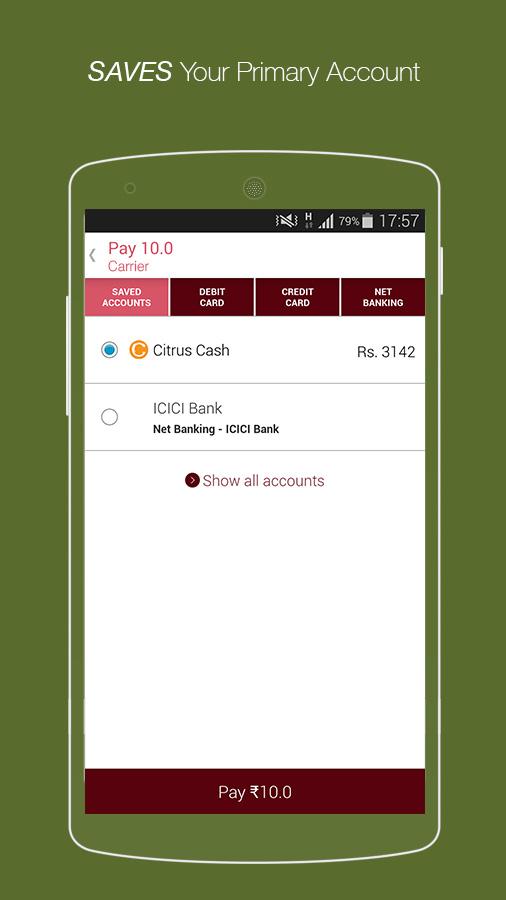
Hay Guys, we are come back with another Recharge + Cash back offer from Citrus.Citrus which is very popular service of payment Gateway service is now offering Rs 50 cash back on Rs 50 Recharge .

It means By spending Rs. 50 you will get Rs 100 recharge, Rs. 50 instant recharge and another Rs 50 in terms of Cash back in your Citrus account. And you can use this amount to recharge or bill payment.

                     https://lh3.ggpht.com/F0Uv9FSzw2CFlxJDTc4-mCvAAiKnUGzblXkCuuIPUQ4Gt9JDZIVx5Xblmk8I80GP9g=h310https://lh3.googleusercontent.com/MdyBScvjUqeCzoTivfxnccCnbqpExpSB-FCaniJbNeNOjMInOdjkxESRQ-sePtxeJEE=h900


How To GET Rs 50 cash Back on Rs 50 Recharge :-
  • First of all Download Their android APP :-[Play Store Link]
  • Now open the app and create A new account with New number.
  • Verify your mobile number and go to Main Screen.
  • Now Do simply Rs 50 or above Recharge from APP.
  • You can choose any payment opction and pay Rs 50.
  • You will get Rs 50 cash back within 3 days in your Citrus account.
  • You can use your cash back amount for recharge or bill payment.
 Usually This offer is only valid if you have been sent a message by Citrus about this offer But i have personally tested that it is give Rs 50 cash back every New user within 3 days.I got cash back on 3 rd Day.
 Terms & Conditions :-
  • The flat cashback of Rs.50 is valid on transaction values of Rs.50 or more.
  • The cashback gets processed automatically after your 1st bill payment: No coupon code is required.
  • The amount will be credited to your Citrus Cash account within 3 working days of your bill payment.
  • Grab your cashback amount by signing in to your Citrus Cash iPhone/Android app at http://m.onelink.me/7bbe76f3.
  • Your Citrus Cash can be utilized towards all/any purchases at 600+ merchants.
  • The offer is only valid for a bill payment made until the 31st May 2015. So hurry!
  • The offer is only valid if you have been sent a message by Citrus about this offer; the offer is not transferable.
  • The amount credited into your Citrus Cash account is subject to the Citrus Cash terms and conditions.
  • Citrus will withdraw the amount credited to your Citrus Cash account if you cancel the bill payment transaction.
  • Citrus reserves the right to not extend the offer to certain users if it believes they have malicious intent.
  • This is a limited time offer, and Citrus reserves the right to withdraw the offer at its own discretion.
  • Here it is the official offer page.

PayTM Loot: Get Rs. 30 cashback on Rs. 30 Recharge at Paytm May- June 2015(New Users)

Guys, Paytm is offering 30 Rs cashback on a minimum 30 Rs Recharge for all the new users,so if you didn’t tried out paytm yet this is the prefect moment,to give it a try,You can avail this offer by just using a coupon we are also adding a bonus coupon for new users choose the one that fits your needs,Using paytm wallet users can easily manage their mobile,dth or data card recharging needs,as well as make payments on various shopping site that accept paytm wallet


Paytm keeps on introducing new offers,coupons for its users in order to cheer them up,here is an example,This coupon can be used only by the Paytm app users ,to avail them follow the steps below.

Steps To Get Rs. 30 Cashback On Rs. 30:-

Download the Paytm app on your Mobile,after successfully downloading the app,signup for your account,initiate a recharge for 30 Rs or more using the coupon DOUBLE30 ,make the payment and complete the recharge,you will get the cashback after recharge successfully completes.

Bonus coupon:-  FREE10=Use this coupon to get Free 10 Rs in your paytm wallet,offer valid only for new users.

Terms:-
1)Offer is available only for new users.
2)Users can avail this offer only once.
3)The offer can be redeemed only at the paytm app.
4)The offer cannot be clubbed with any other offers.

Thursday, 28 May 2015

Airtel 3G New Latest Proxy Trick Working HIGH SPEED | June 2015

https://scontent-hkg3-1.xx.fbcdn.net/hphotos-xat1/v/t1.0-0/p75x225/11262460_891401604251267_5710627148220972904_n.jpg?efg=eyJpIjoiYiJ9&oh=59b887377dde740cd404356d1acbf12d&oe=560C4074
Guys all of you know that Airtel proxy tricks are the oldest members of free internet/ gprs tricks world. Its easy to setup and works for almost everyone who try it. Here we are sharing a high speed proxy server for Airtel which is working for both browsing and downloading. Many of us search for airtel blocked sim proxy but now days rarely any host works for blocked sim. So lets come to this post where we are sharing a latest free proxy trick 2015 which is working on any device. Here we are enclosing few of the features of this proxy trick.

Eye Catching Features-
1.Its a default browser trick.
2.Works on both 2g and 3g network.
3.Works for Android, Java, Symbian, Pc, etc.

How To Use Proxy Trick ?
Proxy tricks are nothing but a simplest form of network tricking method which can be used to access free internet. It works on default browser of the device and doesn't require any technical knowledge, means a newbie [new to tricks] can also setup this. Lets see how to use it on mobile and computer.

For Mobile:
1. Go to settings option.
2. Then open Network Connection Setting.
3. Now in the option, click on create new setting/ connection.
4. There you'll get many input options like Account Name, Access Point, Proxy, etc. (Go to Method two below For all detail)
5. Now save your setting and make it default.

For Computer (PC) / Laptop -
I will recommend you to use Mozilla Firefox for setting up proxy trick.

1. Open Options.
2. Click on advance tab and then network tab.
3. Click on Manual Connection setting and add the above given proxy and port.
3. Save the setting.

Note- If you get low loading speed then disable javascript. You will definately feel the difference.

Huge List Of Free Internet Proxy Trick:

Proxy (choose any one)-
- www.air-proxy.com
- http://199.167.132.128/ (Fast)
- www.air-proxy.com
- zacebook.com
- 0000a-fast-Proxy.de
- german-proxy.de
- 176.126.237.198
- 85.31.188.132
- 162.213.39.110 (resume support)
- iphider.org or 192.99.36.43 (High Speed)
- prx.im or 176.126.237.199
- 216.155.153.105
- 185.12.6.15 (resume support)
- 198.204.237.10
- proxies.us OR 23.105.134.34
- bbproxy.pw OR 198.204.237.11
- 93.115.85.195
- 4everproxy.com OR 192.30.136.222
- hideip.co OR 199.167.133.154
- hiload.org OR 37.48.85.195
- clickbypass.info OR 198.50.152.63
- www.zfreez.com OR www.efreetimes.com OR www.vigoob.com OR 46.105.18.32
- 5.10.71.134 OR Jetproxy.com
- 5.199.140.148 OR proxy.hmastuff.com
- 63.25.153.7
- 5.231.56.12
- 192.99.36.43 (T.N. Highspeed proxy)
- 176.126.237.199 (T.N. Highspeed proxy)
- 198.204.237.11 (T.N. Highspeed proxy)
Port- 80

Homepages- airtelgurus.com or airtelgurus.in[ Recommended : First Use this]
twangmusic.in (Per Day Limit: 300 MB)
125.21.246.116 (Per Day Limit: 200 MB)
180.179.207.111 (Per Day Limit: 200 MB)
180.179.207.113 (Per Day Limit: 300 MB)
one.airtel.in
m.airtellive.com
buddies.airtelmoney.in
ic.bsbportal.com or video.bsbportal.com or Prod.bsbportal.com
airtelgurus.com or video.airtelgurus.com
get.hike.in
get.wynk.in/
56789.airtel.in
live.airtelworld.com or d.airtelworld.com


SIM Block: Dont get afraid by hearing the term SIM Block. Most of you who use Airtel Free Internet are aware of SIM Block. But there are few who dont know this, SIM Block is nothing about permanent SIM Block which will stop you to make calls or SMS or surfing Internet. Its a thing which will stop you just free Internet, basically you cant use free internet during SIM Block. There are lots of way to unblock your SIM. But we will discuss that later.
 
Keep Visiting Daily All Tricks Bazaar For More Working Free Internet Tricks.

Airtel Free 2GB 3G Internet Trick For Moto- E Users [May- June- July 2015]

Hello Guys, Get 2GB 3G Data on your Airtel mobile for 2 months absolutely Free. To use this trick you should have 2 Airtel sims with 3g activated & Moto- E mobile.

How to get free internet on Airtel :
• Insert one Airtel sim in sim slot 1 of your Moto E.

• You should have a little amount of data on your airtel number as you need to connect to internet for a while. But in some states this page opens for free without Internet data.

• Now open the following link on your Default Browser or Chrome: http://airtellive.com/offers

• After opening that page, you can see a offer "500 MB free 3G for 2 months".

• So immediately activate the offer.

• You will get a confirmation sms on your mobile soon.


• Now insert another Airtel sim on Slot 2 & apply the above trick again to get 500 MB 3G on that sim too.

• Hence, you have got 1 GB Data. Next month you will get another 1 GB 3G internet for free.

• So enjoy unlimited 2GB 3G Data on Airtel for 2 Months.